Access Presets in iglooworks PM Mode: Reusable Access Configurations for Faster Resident Onboarding
July 20, 2026 · by igloo
Access Presets in iglooworks PM Mode: Reusable Access Configurations for Faster Resident Onboarding
Here is a scenario that plays out quietly across multifamily properties every week.
Two residents move into the same building on the same day. Same unit type. Same lease terms. Different staff members handle each move-in. By the end of the day, one resident has access to the gym, the pool, and the main lobby. The other has access to the gym, but not the pool, because nobody remembered that unit type includes pool access, and there was no system in place to catch the gap.
Neither staff member made a mistake on purpose. The process just had no guardrails. The correct access configuration lives in someone's head, not in the platform: and heads are unreliable when move-in days are busy, staffing turns over, and nobody has time to double-check.
When access control is tied to repeatable workflows, you remove guesswork and reduce reliance on memory. Access should be ready before the resident arrives, not figured out during handover.
Access Presets in iglooworks PM Mode are the system that removes the guesswork permanently.
What Access Presets actually are
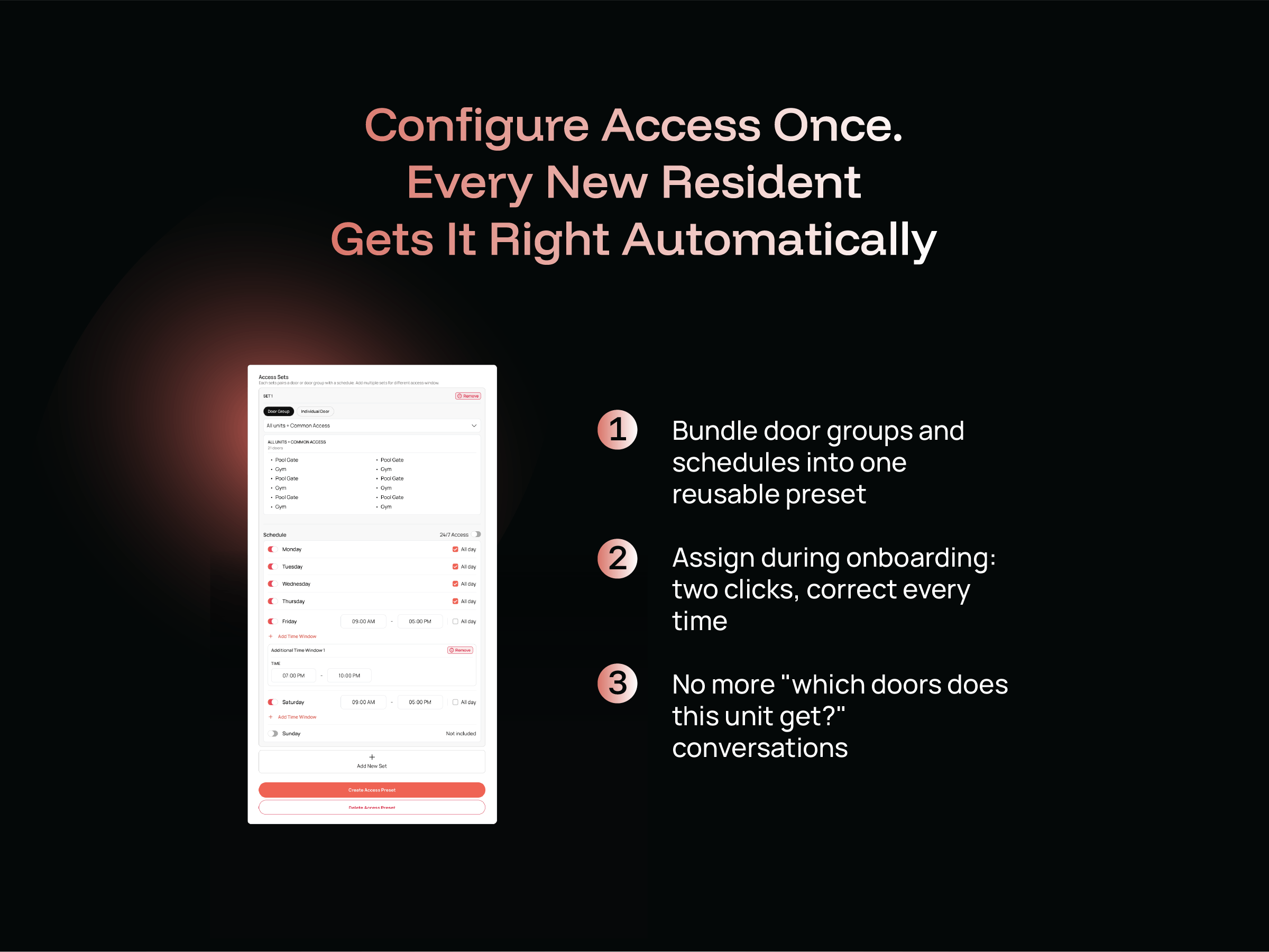
An Access Preset is a saved, reusable access configuration: a bundle of door groups and schedules stored in the PM Mode dashboard that can be assigned to any resident during onboarding in two clicks.
Here is how the architecture works. Door Groups are the building blocks. A Door Group is a collection of access points that logically belong together: the gym and pool might form an "Amenities" group, the main entrance and lobby form a "Common Access" group, a unit door sits in its own group. Each access point in iglooworks PM Mode can belong to up to five Door Groups, giving property managers the flexibility to configure access across overlapping zones without duplicating entries.
A Preset then bundles one or more Door Groups with a schedule: specific days, specific hours, specific windows. "Adult Resident Access" might include the unit door (24/7), building entrance (24/7), gym access (Monday to Friday, 6am to 10pm), and pool access (daily, 7am to 9pm). Save that configuration as a Preset. It now exists as a reusable template that any staff member on any shift can assign to any eligible resident in the same two-step process, every single time.
The sync status on each Door Group is visible in real time: staff can see whether the access keys have been successfully pushed to the physical devices before a resident walks up to a door. If something needs syncing, it is flagged before it becomes a problem.
The structural case for why this matters
Residents scoring 9 to 10 on NPS renew at 70 to 80% versus under 30% for those scoring 0 to 6, and satisfaction is set in the first 30 days. The first interaction a resident has with the property's systems: which begins at move-in, directly shapes that trajectory. An access error on day one, a door that should open but does not, a pool they were promised but cannot reach, these are not minor administrative slip-ups. They are the beginning of a resident relationship that starts below zero.
At portfolio scale, onboarding that lives in individual managers' heads does not travel. The checklist must deliver the same new-resident experience across markets, asset classes, and on-site teams.
That principle applies directly to access configuration. A checklist can remind someone to assign access. Only a system like Access Presets can guarantee it is the right access, every time, regardless of who is doing it.
Today's residents expect convenience, consistency, and responsive service across every touchpoint of their living experience. When operations fall short, frustration builds quickly. Access is one of the first touchpoints. Getting it wrong, or getting it inconsistently right, signals to a resident that the property is not well managed, even when the error was nothing more than a process gap.
How it works inside the onboarding flow
Access Presets sit inside the resident creation flow in PM Mode. Once the Community Setup Wizard has mapped the property structure and Door Groups have been defined, building Presets is a one-time configuration task. From that point forward, every new resident onboarding session follows the same path.
Staff opens the Add New User flow. They fill in the resident's details and unit on the left side of the form. On the right, they select the appropriate Access Preset from a dropdown. The platform immediately shows which doors are covered, which are synced and ready, and which may need a device update before the resident's access start date. Door readiness is surfaced live: if a lock is not yet wallet-credential-ready, it is flagged before the pass is confirmed, not discovered after the resident has already tried to use it.
The access period is set to match the lease window by default. The Wallet Pass credential is issued. The entire configuration: every door, every schedule, every permission, is locked in and corrected before the resident ever arrives.
Two clicks. Right access. Every time.
The consistency argument at scale
The shift in 2026 is from disconnected tool stacks to integrated platforms organized around the resident lifecycle. Access Presets sit squarely in that shift. They are not a standalone feature: they are the access configuration layer of a platform that is built around how property managers actually think and operate.
The operational benefit compounds at scale. A single-property team managing 50 units might absorb the inefficiency of manual access configuration. A regional manager overseeing five properties and 500 units cannot. When the right access configuration is encoded in a Preset rather than in a team member's memory, it scales without degradation. The 500th resident gets exactly the same correctly configured access as the first, regardless of which property, which staff member, or which day of the week.
Each property ends up operating slightly differently, which makes consistency harder to maintain as the portfolio grows. Access Presets are specifically designed to prevent that divergence. The configuration is centralized, named, and reusable. What works at one building can be replicated at the next without rebuilding from scratch.
The bottom line
Inconsistent resident access is not caused by careless staff. It is caused by systems that ask people to remember things that should be encoded in the platform. Access Presets remove that dependency entirely. The right configuration is built once, saved, and assigned, the same way, every time, by anyone on the team.
For property managers operating at any meaningful scale, that is not a convenience. It is the foundation of a resident experience that starts correctly and stays that way.